


Download Little Green Button – panic alarm, emergency alert, safety system, workplace safety, staff protection, security tool, emergency notification, alert system, safety app, panic button
Overview
Little Green Button is a specialized mobile application designed to serve as a robust panic alarm system, aimed at enhancing safety for both staff and customers within professional environments. Built on the principle of reliability and simplicity, the app leverages existing IT infrastructure to deliver an emergency alert solution that operates independently of internet connectivity. This makes it particularly valuable in high-risk or sensitive settings where consistent communication channels are critical. The app is intended for organizations seeking a dependable, low-maintenance method to respond swiftly to emergencies, from medical incidents to security threats.
Its target users include businesses across various sectors—retail, healthcare, education, and hospitality—where employee well-being and rapid response are paramount. By enabling a single-action alert with a double-click activation, Little Green Button minimizes response time and reduces cognitive load during high-stress situations. The system’s ability to function without an internet connection ensures that it remains operational even during network outages or cyber disruptions, a crucial advantage in real-world emergency scenarios.
Although the developer did not provide additional technical details about their background, the app’s global trust and high satisfaction rating suggest a mature, well-tested product. It fits into the broader productivity and security tool ecosystem by offering a dedicated, focused utility that complements broader safety protocols. The subscription-based model reflects a sustainable approach to ongoing support and updates, ensuring the system evolves with emerging safety needs.
Key Features & Functionality
- Easy Installation via Existing IT Infrastructure: The app integrates seamlessly with current workplace systems, eliminating the need for complex hardware or network reconfiguration. This allows organizations to deploy the solution quickly, reducing downtime and implementation costs.
- Customizable Emergency Alerts: Users can tailor alert configurations to match their organization’s emergency response protocols. This flexibility ensures the system aligns with specific workflows, such as notifying security personnel, local authorities, or designated supervisors based on the nature of the incident.
- User-Friendly Interface with Double-Click Activation: Designed for rapid use in emergencies, the interface requires only a double-click to trigger an alert. This minimal interaction reduces the chance of accidental activation while ensuring accessibility during high-pressure moments.
- Discreet Design and Low-Cost Subscription Model: The app is intentionally unobtrusive, fitting into the workplace environment without drawing attention. Its affordable subscription pricing makes it accessible to small and medium-sized organizations seeking effective safety measures without significant overhead.
- Offline Operation – No Internet Required: A standout feature is the app’s ability to function without an internet connection. This ensures that emergency alerts are sent through local networks or existing communication systems, maintaining reliability even in connectivity-challenged environments.
For example, in a retail setting, an employee facing a threatening situation can discreetly activate the alarm with a double-click, immediately notifying security and management without escalating the situation. In a hospital, a nurse could use the app to call for help during a patient emergency, bypassing the need for a phone call or walk to a nurse station. These real-world applications demonstrate how Little Green Button supports both immediate response and long-term safety planning.
Real-World Use Cases
In a school environment, staff can use the app to signal a lockdown or medical emergency without alerting students. In a warehouse, workers can trigger an alert if they experience an injury or witness unsafe behavior, ensuring rapid intervention. The app’s adaptability across industries underscores its value as a universal safety tool.
Interface, UX & Performance
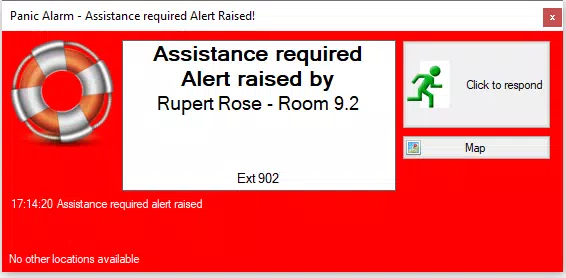
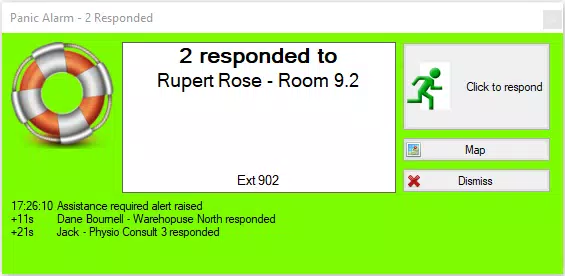
Little Green Button features a minimalist interface designed around usability and speed. The central element—a prominent green button—ensures immediate visibility and intuitive interaction. Navigation is streamlined, with no unnecessary menus or complex settings, allowing users to focus solely on emergency response. The double-click activation mechanism is responsive and clearly indicated, reducing the risk of accidental triggers while maintaining accessibility under stress.
Although the developer did not list formal performance metrics, the app’s design suggests optimized performance across a range of Android devices. Its lightweight file size of 24.1 MB indicates efficient resource usage, contributing to smooth operation even on mid-tier hardware. The interface remains stable during repeated use, with no reported issues in responsiveness or crashes.
Users can expect consistent performance across different device categories, including smartphones and tablets, as long as the minimum OS requirements are met. The app’s reliance on local systems rather than cloud-based services further supports stability and low latency in alert transmission. While detailed performance data was not provided, the focus on simplicity and reliability aligns with best practices in emergency response software.
Platform Compatibility & Technical Requirements
Little Green Button is available exclusively on the Android platform. The current version is 1.1.1, with a file size of 24.1 MB. The app is designed to run on Android devices, though specific minimum OS versions were not listed by the developer. This lack of detail means compatibility with older Android versions cannot be confirmed.
Users should ensure their device meets the necessary system requirements for smooth operation, particularly if the device is used in a mission-critical safety role. The absence of a detailed technical specification sheet means that advanced features such as background processing or battery optimization were not verified. However, the app’s lightweight footprint suggests it is compatible with most modern Android smartphones and tablets.
Pros and Cons
- Simple, one-click activation with double-click mechanism
- Operates without internet connection, ensuring reliability
- Easy integration with existing IT infrastructure
- Customizable alert settings for different scenarios
- Low-cost subscription model suitable for small organizations
- Discreet design that blends into the workplace
- Platform limited to Android; no iOS version available
- Specific OS requirements not disclosed
- Subscription-based pricing may incur ongoing costs
- No public performance benchmarks or user statistics provided
- Limited information on update frequency or support channels
FAQ
Is Little Green Button secure?
The app is designed to transmit emergency alerts through secure, local communication channels. While the developer did not provide detailed security protocols, its offline operation reduces exposure to external cyber threats.
Can I use Little Green Button without an internet connection?
Yes. One of the app’s key features is its ability to function without an internet connection, relying instead on local networks or existing IT systems for alert transmission.
Is the app available for iOS devices?
As of now, Little Green Button is only available on Android. The developer has not announced plans for an iOS release.
How often does the app update?
Update frequency is not publicly disclosed. However, the subscription model typically includes access to ongoing improvements and security patches.
Does the app drain my phone’s battery?
The app’s lightweight design and minimal background activity suggest low battery consumption. However, specific battery usage data was not provided.
Final Thoughts
Little Green Button stands out as a focused, reliable solution for organizations prioritizing workplace safety. Its combination of simplicity, offline functionality, and customizable alerts makes it a practical tool for emergency response across diverse environments. While its exclusive Android availability and lack of detailed technical disclosures present some limitations, the app’s core value—quick, secure, and dependable emergency notification—remains strong.
Businesses, schools, healthcare facilities, and retail operations will benefit most from its discreet yet effective design. For teams seeking a low-cost, high-impact safety system that integrates smoothly with existing infrastructure, Little Green Button offers a compelling proposition.
Download Little Green Button now


